
Delight Customers with Improved Customer Support and Maintenance with Movatic

Movatic is making it easier for system administrators to delight their customers with improved customer service and maintenance. With the launch of Movatic's maintenance and support module, admins now have a set of powerful tools to make support communication easier, provide better tracking, and the ability to retain better records.
Improved Customer Support
The error reports section has been renamed to Customer Support on the admin site to create a strong focus on the customer. The customer support section has been revamped to make management more effective.

More Information
All relevant user information is now present on the reported problem. The user app has been improved to allow for problem reporting as part of the rental flow, active rental card, or from the rental history card. A report from any of these locations displays the associated rental on the admin site.
Communication Logging
Admins now can contact users directly from the admin site with the user's response appearing on the admin site in the communication log. Furthermore, admins can record internal notes within the communication log that are not shared. Another great feature is that every time a report comes in, or when a user responds, admins who opt into problem reports emails receive an email notification.
Better Linking
The rental detail page, and user detail page now display all related reported problems, making support quicker and easier.
Creating Maintenance Tickets
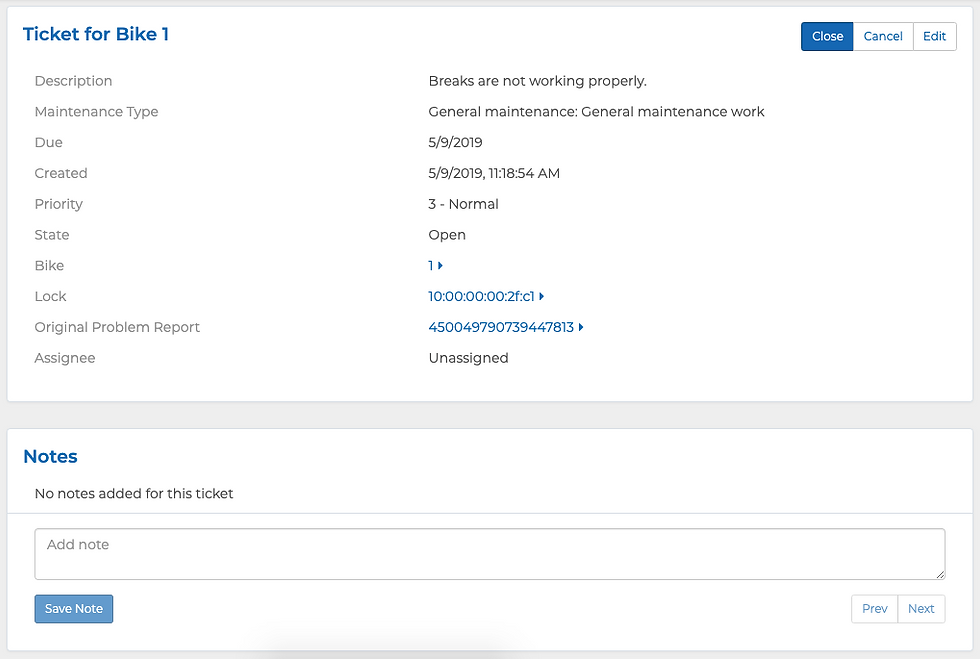
A significant part of this update is the support for maintenance tasks and tickets. Admins can now escalate a problem report into a ticket. A maintenance ticket is a task that will be completed at some point in the future. The power of maintenance tickets is that they allow for several things:
Inbox Zero: Close user problem reports quicker, as you no longer need to wait to close a problem report until the maintenance is complete. With an inbox zero mentality, ensure a high level of customer service with reports resolved quickly and none of them missed.
Separation of Roles: Your maintenance team does not have to be your support team. Instead your customer support team can focus on supporting the customer and your maintenance team can concentrate on resolving maintenance issues.
Maintenance Tasks, Tickets, Logs, and Recurring Tickets
Movatic takes maintenance to the next level with tasks, tickets, logs and recurring tickets.
Maintenance Task
A maintenance task is a set of predefined work that can be carried out to fix or maintain your system's hardware.
Maintenance Ticket
A maintenance ticket is a maintenance task (work) that needs to completed on your system. Maintenance tickets can be created by escalating a problem report, by an admin manually, or automatically by the system as part of a maintenance program. Maintenance tickets also help with organization as tickets can be assigned to an admin for completion, as well as have a priority and due date. Details on the work done for this ticket can be recorded in the notes section. Upon ticket completion, the completing admin can record additional notes along with the amount of time spent on the ticket.
Maintenance Log
Upon completion of a maintenance task, the system creates a maintenance log (a log of completed work). Maintenance logs can be created manually by admins or automatically upon completion of a maintenance ticket.
Recurring Tickets
The system also supports the automatic creation of tickets based on a maintenance program. A maintenance program is particularly helpful in ensuring that maintenance is regularly carried out. Without regular maintenance, hardware breaks, creating user experience and liability issues. If available for your system type, a maintenance program can be set in the general settings section.
More to Come
This release is the first step in our long term road map for support and maintenance. Here are a few things that we are planning for the future:
Better issue tagging so that users are able to provide more detail on what went wrong.
The ability for users to view and continue the conversation with admins on reported issues in addition to our current email setup.
Customizable automated initial response message.
Partnerships so that systems can outsource their maintenance and customer support.


Thấy B33 được chèn vào và được mọi người nhắc tới nhiều. Mình bấm xem cho biết, để xem cách trình bày và cấu trúc nội dung. Lướt nhanh thì thấy tổng thể khá gọn gàng, tạo cảm giác đáng tin cậy. Với mình, chỉ cần nội dung gọn gàng như vậy là đủ để mình nắm bắt thông tin cơ bản.
88bet tình cờ được mình biết đến khi đang đọc một bài viết về quản lý tài liệu và xem phần nguồn tham khảo ở cuối trang. Thấy tên này nằm trong danh sách nên mình mở thử cho biết, chủ yếu tò mò xem cách trình bày có khác những công cụ mình từng thấy không. Mình chỉ lướt qua vài trang, không đi sâu vào từng tính năng. Điều dễ nhận thấy là bố cục khá sạch, tiêu đề và nội dung được phân biệt rõ, chuyển qua các khu vực cũng tương đối thuận. Xem nhanh trên máy tính lẫn điện thoại đều không tạo cảm giác quá rối.
cổng game dola789 là thương hiệu mình vô tình biết đến trong lúc đọc một bài viết về quản lý tài liệu và xem qua phần tài liệu tham khảo bên dưới. Vì tò mò nên mình đã truy cập website để tham khảo cách thiết kế cũng như trình bày các nội dung trên trang. Mình chủ yếu lướt qua một số khu vực, chú ý đến giao diện tổng thể và cách bố trí các danh mục, chưa dành nhiều thời gian khám phá từng tính năng. Cảm nhận ban đầu là website có bố cục khá gọn gàng, các tiêu đề và nội dung được sắp xếp tương đối rõ nên dễ theo dõi. Việc chuyển đổi giữa…
789club com là cái tên mình tình cờ biết đến khi đang đọc một bài viết về quản lý tài liệu và bắt gặp trong phần tham khảo cuối bài. Vì tò mò nên mình ghé vào website xem thử giao diện và cách trình bày nội dung. Mình chỉ lướt qua một vài chuyên mục, chưa tìm hiểu sâu về các tính năng bên trong. Cảm nhận ban đầu là trang có bố cục khá dễ nhìn, các phần thông tin được phân chia tương đối rõ ràng nên không mất nhiều thời gian để làm quen. Việc chuyển qua lại giữa các danh mục cũng khá thuận tiện, không tạo cảm giác rườm rà. Mình còn thử truy cập…
BJ66 xuất hiện trong một danh sách website mình vô tình thấy khi đọc tài liệu về trải nghiệm người dùng trên môi trường số. Vì đang có vài phút rảnh, mình mở liên kết để xem cách nền tảng tổ chức nội dung thực tế. Các phần thông tin được phân chia khá hợp lý, không dồn quá nhiều chi tiết vào cùng một khu vực. Mình thử chuyển qua vài danh mục để quan sát cách điều hướng, sau đó đóng tab chứ không dành thời gian khám phá thêm. Ấn tượng ban đầu là giao diện tương đối gọn, các mục chính dễ nhận ra ngay cả khi chỉ xem lướt.